It's a quiet day: one practical self-hosting recipe, plus an insider account of why Anthropic moved its source control off Git.
Picked from 48 new articles across 34 sources · arrow keys for other days
Today in 30 seconds
30s left
Tailscale published a Docker Compose setup that runs a Tailscale container next to FreshRSS, so the feed reader is reachable only on your private tailnet. story 1 ↓
You don't open any ports, set up a reverse proxy or manage certificates. The app gets its own private hostname on your network. story 1 ↓
The same pattern should work for most self-hosted web apps. Bear in mind it comes from the vendor, so it's a recipe, not an independent review. story 1 ↓
The Pulse leads with espionage accusations against an OpenAI engineer, but the more useful part is how and why Anthropic moved its source control off Git.
1/1Tailscale· Kevin Purdy· Oct 16
Self-hosting a FreshRSS feed reader that's reachable only over Tailscale
Tailscale's Kevin Purdy walks through running FreshRSS, a self-hosted feed reader, with Docker. A prebuilt config joins it to your private Tailscale network, so you can reach it from any of your devices while it stays off the public internet.
Why it matters · It's a short, repeatable way to put a self-hosted web app on a private network without a reverse proxy, open ports or certificate setup. It's also a vendor tutorial, not engineering analysis.
Know this first
Context from the editor, not the article · 32 sec
1 · RSS and feed readers
RSS is an XML format sites publish so software can poll them for new posts. A feed reader fetches many feeds and shows the items in time order, with no ranking algorithm. Google shut down Google Reader, the most popular hosted reader, in 2013.
2 · Tailscale and tailnets
Tailscale builds a private mesh network on top of WireGuard encrypted tunnels. Each enrolled device or container becomes a node on your 'tailnet' and gets a stable name under a .ts.net domain. Other nodes can reach it, but the public internet can't.
3 · Docker Compose
Docker runs apps in isolated containers. Compose reads a compose.yaml file that describes several containers, their networks and storage volumes. It usually takes settings from a .env file. docker compose up -d starts them all in the background.
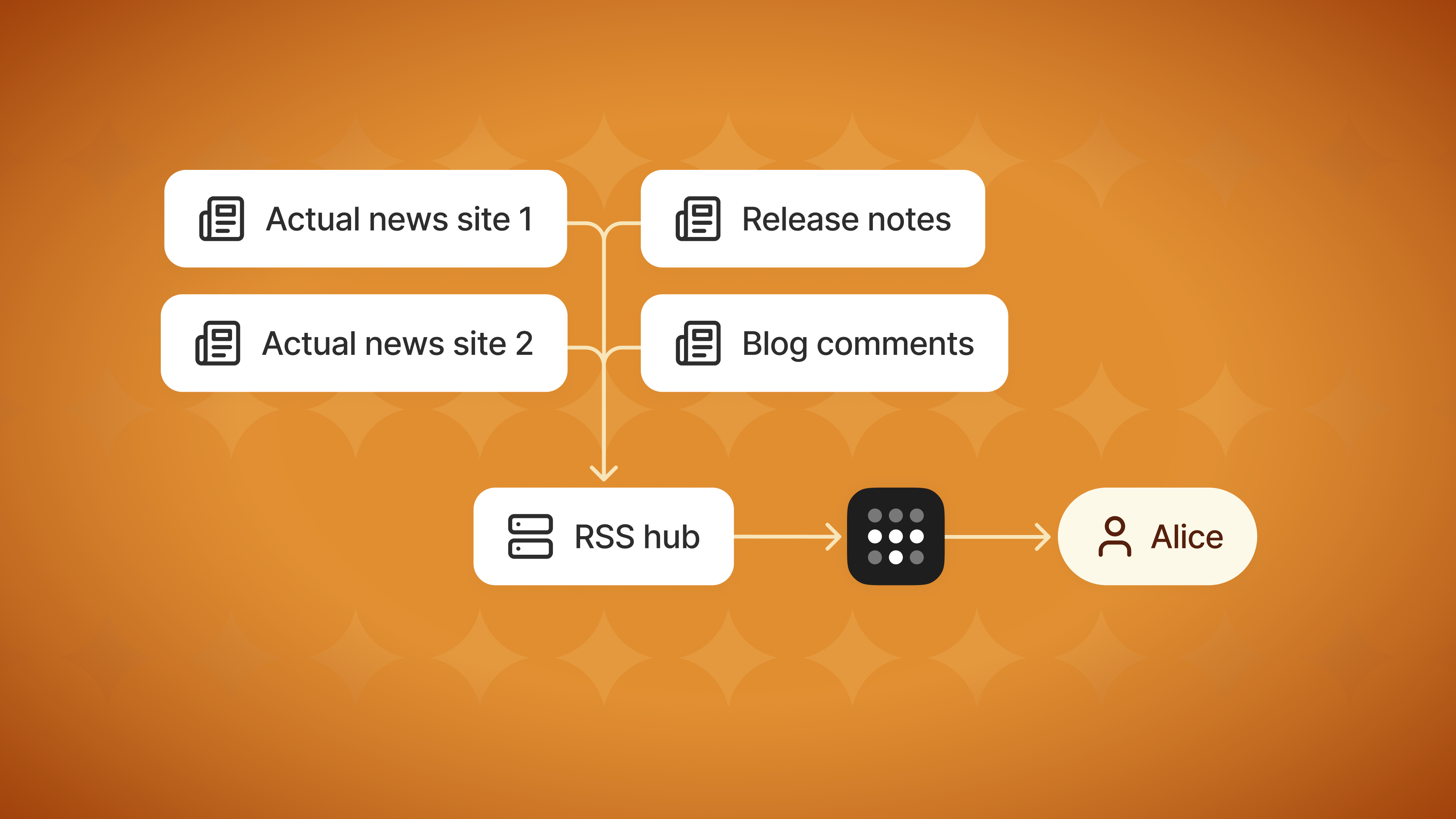
How the hub pulls in feeds from news sites, release notes and comments, filters them and delivers them to one reader.1 / 4
Remember
A Tailscale container in the Compose stack gives FreshRSS a private hostname, with no open ports or reverse proxy.
FreshRSS keeps the API password separate from the web login, so client apps never hold the dashboard credential.
The tutorial skips backups, upgrades and key rotation, so running it long-term is up to you.
Tailscale has published a tutorial by Kevin Purdy on self-hosting an RSS reader. It uses 1, an open-source app that both fetches feeds and displays them. The app runs in Docker and joins your Tailscale network, so your devices can reach it and the public internet can't. Purdy argues that RSS is the non-algorithmic option: you choose the sources and see their posts in order. It's a vendor how-to with no measurements, but the deployment pattern is neat.
Why this setup
Self-hosting is usually easy to install and annoying to reach. Getting to it from your phone normally means a forwarded port, a reverse proxy, a TLS certificate, and a login page facing the internet. Here the app gets a name only on your 2, Tailscale's private network built on 3 tunnels, so none of that is needed.
How it works
Purdy added FreshRSS to 4, a repository of 5 setups that each join a tailnet on their own. Running it starts two containers, tailscale-freshrss and app-freshrss. The steps:
Windows users need to save .env with LF line endings, not CRLF. If the logs show auth errors, generate a fresh key and run the stack again.
Other clients
FreshRSS has a 7 at /api/greader.php, a protocol many feed apps still support. Once API access is on, apps like NetNewsWire and Reeder can connect with the API password. That password is kept separate from the web login, so client apps never hold your dashboard credential. Scripts can use the same endpoint.
What's missing
The article doesn't cover backups, upgrades, how often feeds are polled, resource use, or rotating auth keys. Reaching the reader also depends on Tailscale's coordination service and on its client running on every device. A local-IP URL is the fallback. Purdy's closing point is that Google Reader's 2013 shutdown didn't kill RSS, and that curating your own feeds is "seed work that pays off over time."
Tailscale has published a tutorial by Kevin Purdy on self-hosting an RSS reader. It uses 1, an open-source app that both fetches feeds and displays them, and runs it in Docker containers. The reader joins your Tailscale network, so every device you own can reach it and nobody on the open internet can. Purdy pitches it as a way out of algorithmic feeds: you pick the sources and get their posts in order. The setup is the part worth a look.
Be clear about what this is: a vendor how-to, not a systems deep-dive. It has no measurements and no failure analysis. Still, the deployment pattern is tidy and you can reuse it for other small self-hosted services.
The problem it sidesteps
The awkward part of self-hosting a web app is usually access, not installation. To reach a reader from your phone you would normally need a public IP or a forwarded port, a reverse proxy, a TLS certificate and some hardening, because the login page now faces the whole internet. Purdy's approach skips all of that. The app gets an address only on the 2, Tailscale's private network built on 3 encrypted tunnels. Any device logged into your tailnet can reach it, and nothing else can.
How the setup fits together
The tutorial builds on 4, a community repository of 5 setups that are each preconfigured to add themselves to a tailnet. Purdy added a FreshRSS entry. Its folder holds a and a file. When the stack runs, it starts two containers: and . The article doesn't explain how they are wired together. In the common version of this "" pattern (general background, not detail from the article), the app container shares the Tailscale container's network, so the app shows up on the tailnet as its own node.
The steps:
As an example, with the default service name and a tailnet called noodlefish-velociraptor.ts.net, the reader is at http://freshrss.noodlefish-velociraptor.ts.net. That name resolves only for devices on the tailnet.
Gotchas the article calls out
Line endings on Windows. Purdy says to edit .env in VS Code and make sure the file is saved with LF line endings, not Windows-style CRLF. The article doesn't say why. The likely reason is that a trailing carriage return ends up inside values such as the auth key.
Expired or invalid keys. If docker compose logs tailscale shows auth errors, create a new key, paste it into .env and run up -d again. The tutorial doesn't cover key expiry or how to rotate keys over time.
Finding feeds. Pasting a site's base URL into FreshRSS's "Add a feed" box often finds the feed automatically. If it doesn't, look for RSS links in a site's footer or blog section. Purdy points to the EFF's (Electronic Frontier Foundation) RSS guide for feeds from YouTube, Reddit and similar sites.
Using other clients through the API
FreshRSS offers a 8 at /api/greader.php. Many feed apps still speak this protocol, which copies the one Google's defunct service used. To turn it on, enable "Allow API access" under Authentication and confirm an API password is set under Profile. Native readers such as NetNewsWire and Reeder can then connect. You give them either the tailnet URL (https://freshrss.<tailnet>.ts.net/api/greader.php) or the local one (http://<IP>:8080/api/greader.php), plus the API password, which is separate from the web login password. Separate passwords mean a client app never holds your dashboard credential. Purdy mentions that scripts and agents can use the same endpoint: they POST credentials to get a token. He also says he has a model summarise his feeds twice a day.
Trade-offs and open questions
Encryption. Traffic between your devices travels inside Tailscale's WireGuard tunnels. That explains why the browser URL can be plain http. The API example uses https, and the article doesn't say whether, or how, TLS certificates get set up.
Dependency on Tailscale. You don't run public infrastructure, but reaching your reader depends on Tailscale's coordination service and on having its client on every device. The local-IP URL is the fallback.
What it leaves out. There's nothing on backups of FreshRSS's data volume, updates, how often feeds are polled, or resource use. Anyone treating this as a long-lived service has to work those out.
Purdy's broader argument is that Google Reader's death in 2013 didn't kill RSS. The cost of escaping algorithmic feeds is curating your own list, which he calls "seed work that pays off over time."
Install Docker and check it with docker run hello-world.
Clone ScaleTail and go into services/freshrss.
In Tailscale's admin console, create an 6, a credential that lets a new node join without an interactive login.
Fill in .env: the auth key, timezone, tailnet name, a dashboard password, a separate API password, an email, and optionally the node name.
Run docker compose up -d, check with docker compose ps, then open http://freshrss.<your-tailnet>.ts.net.
compose.yaml
.env
tailscale-freshrss
app-freshrss
6
Install Docker. Run docker compose version to check for an existing install. On Linux, the get.docker.com script installs it. sudo usermod -aG docker $USER lets you run Docker without sudo, and docker run hello-world confirms it works. On Windows or macOS you use Docker Desktop.
Get the files. Clone ScaleTail (or download its ZIP on Windows) into ~/docker, then cd into services/freshrss.
Create a Tailscale 7. This is a pre-generated credential that lets a new node join your tailnet without an interactive login. You make it in the admin console under Settings > Keys, turning on "Pre-approved" if the option appears.
Edit .env. The settings are:
TS_AUTHKEY: the key from step 3.
TZ: your timezone, e.g. America/New_York.
TAILNET_NAME: your tailnet's DNS name, e.g. velociraptor-noodlefish.ts.net.
ADMIN_PASSWORD: for the web dashboard.
ADMIN_API_PASSWORD: for outside access to feeds and data.
ADMIN_EMAIL: usually your own address.
SERVICE: the node's name, freshrss by default.
Start it with docker compose up -d. docker compose ps should eventually show the Tailscale container as healthy and the app as running.