Who Gets In, and Through Which Door · Morning Gist
Tuesday, October 203 stories · 10 min
Who Gets In, and Through Which Door
Three engineering teams on routing and access: steadier gateway choices at Tailscale, real exposure scanning at Shopify, and Cloudflare's case for hiding login pages.
Picked from 56 new articles across 34 sources · arrow keys for other days
Today in 30 seconds
30s left
Tailscale's MagicRoute now ranks gateway nodes by rough client distance, not relay region, so a few milliseconds of jitter no longer make clients switch gateways. story 1 ↓
Clients stay on a healthy gateway once assigned. The general fix: replace a noisy signal with a stable one and make assignments sticky. story 1 ↓
Shopify's Overexposed scanner pulls services from Google Cloud's live inventory, not config files, to find web apps that let anyone in without logging in. story 2 ↓
Each endpoint gets one of six verdicts, each backed by evidence, so the scanner reports when it's unsure instead of guessing. story 2 ↓
Two Citrix NetScaler flaws under active attack let attackers run commands without logging in. Cloudflare says to check identity at the edge and close every direct path to the origin server. story 3 ↓
1/3Tailscale· Simon Law, Amal Bansode, Kevin Purdy· Oct 19
Tailscale picks gateway nodes by client distance instead of relay region
Tailscale released MagicRoute, in beta, which assigns each client a gateway machine ranked by rough geographic distance. Its earlier latency-based region scheme let small network jitter break SSH sessions and file transfers.
Why it matters · It shows a common failure in distributed systems: a jittery input drives assignments that cascade, and the fix is a stable signal with sticky assignments.
Know this first
Context from the editor, not the article · 40 sec
1 · Tailscale and tailnets
Tailscale builds a private mesh network, called a tailnet, out of WireGuard encrypted tunnels between devices. When two devices can't connect directly, traffic goes through DERP relay servers. Tailscale runs DERP servers in regions around the world, and each node picks a 'home' region, normally the one with the lowest latency.
2 · Connectors reach other networks
Some tailnet machines act as gateways. A subnet router advertises a range of private IP addresses, such as an office LAN or a cloud network. An app connector forwards traffic for particular domains. Admins often run several gateways that advertise the same routes, for redundancy, capacity or to be closer to users.
3 · Why switching gateways hurts
2/3Shopify Engineering· Oct 19
How Shopify's scanner finds web apps that let strangers in without logging in
Shopify built Overexposed, a scheduled scanner that takes its list of deployed services from Google Cloud, probes each one anonymously, and records a verdict with its evidence. Rule changes cut "can't tell" Ingress results by about 80%.
Why it matters · It's a clear case study in the gap between declared config and enforced reality, and in designing a classifier that reports uncertainty instead of guessing.
Know this first
Context from the editor, not the article · 30 sec
1 · Ingress and Cloud Run
A Kubernetes Ingress is a rule that sends outside HTTP traffic to services inside a cluster. On Google Kubernetes Engine (GKE), it creates a Google load balancer. Cloud Run is Google's serverless container service, where each service gets its own HTTPS endpoint.
2 · Admission controllers
Kubernetes can run admission controllers: plugins that check or rewrite a resource when the cluster accepts it. So the object actually running can differ from the YAML a team committed to git.
3 · Server-side request forgery
SSRF is an attack that tricks a server into sending requests to places the attacker can't reach directly, such as internal services or the cloud metadata endpoint that hands out credentials. Any tool that fetches arbitrary URLs is a target.
3/3Cloudflare· Grant Bourzikas· Oct 19
After a Citrix NetScaler exploit, Cloudflare argues for gating login pages before they're reachable
Attackers took over Citrix NetScaler gateways without logging in. Cloudflare says patching and firewall rules are not enough on their own. It argues for checking identity before traffic reaches the gateway and blocking every way around that check.
Why it matters · Any login page open to the whole internet can be attacked before anyone signs in. Deciding who can reach a service at all is a design choice that limits the damage from the next unknown bug.
Know this first
Context from the editor, not the article · 30 sec
1 · What NetScaler Gateway does
Citrix NetScaler Gateway is an appliance that sits at the network edge. Remote users log in through it, then get their virtual desktops and apps. It has to be reachable from the internet, so its login page faces every attacker online.
2 · Pre-auth vulnerabilities
A pre-authentication flaw can be exploited before anyone logs in. That makes it the worst kind for an internet-facing login service. Any anonymous scanner can attack it, and passwords and multi-factor authentication don't help.
A gateway holds the state of every connection passing through it. If a client moves to a different gateway partway through a session, its TCP connections reach a machine that has never seen them, so they break. Any routing scheme has to weigh picking the fastest path against staying put.
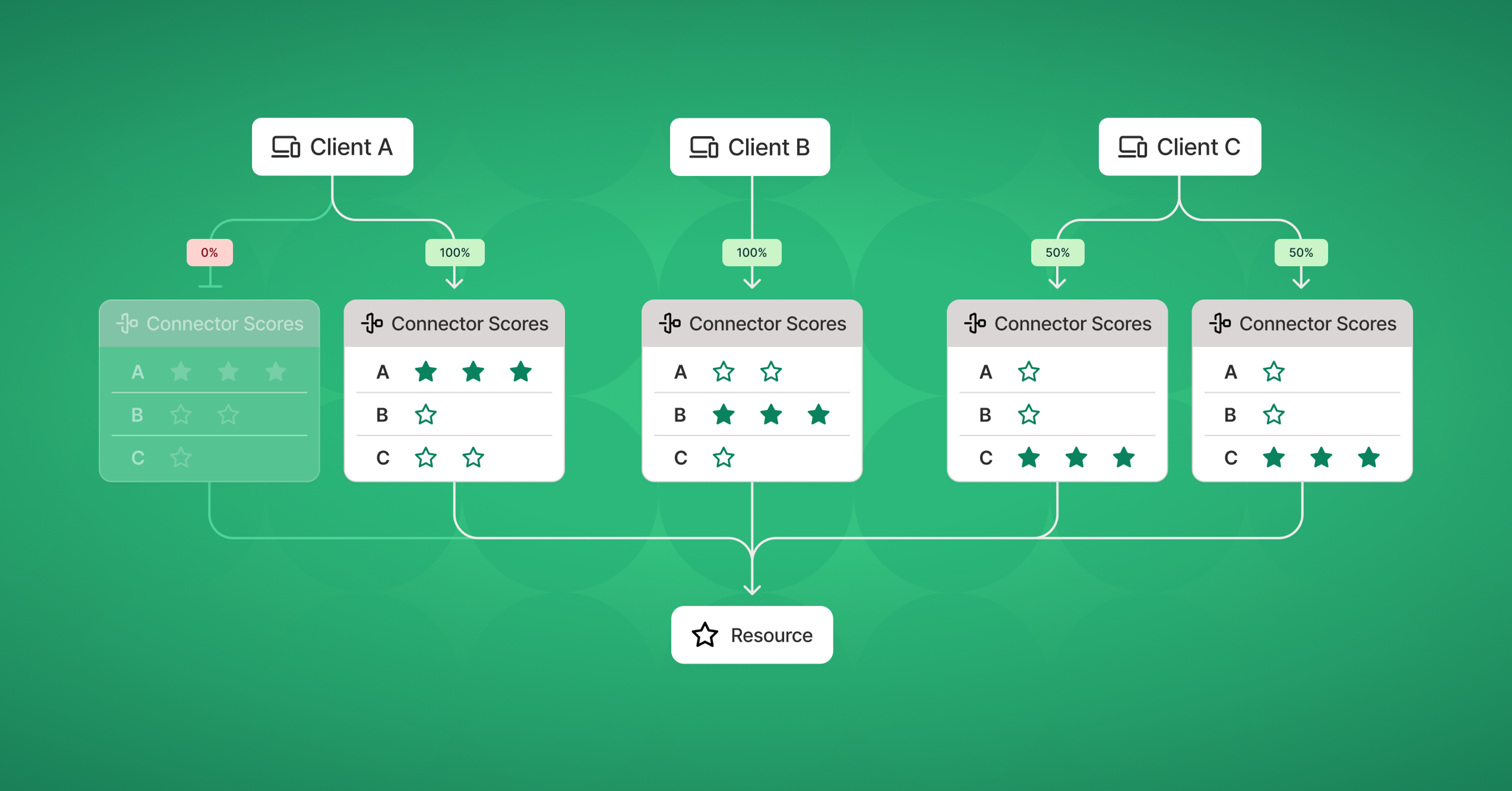
Clients pick among top-ranked connectors: an offline one gets no traffic, and two healthy ones split 50/50.1 / 3
Tailscale has released MagicRoute in beta for Premium and Enterprise customers. It decides which gateway machine each client uses when several machines advertise the same network routes. It replaces "regional routing," whose latency-based assignments could flap and break live connections.
The setup
In a Tailscale network (a "1" of 2 tunnels), some machines act as gateways. Subnet routers expose private IP ranges, 3 forward traffic for specific domains, and Tailscale Service hosts serve named services. The article calls them all "connectors." Teams run overlapping connectors for redundancy, capacity or proximity, so each client needs a rule for picking one.
Why regional routing failed
Regional routing matched clients with connectors in the same 4. 5 is Tailscale's network of relay servers, and each node takes the lowest-latency region as its home. The authors describe how this went wrong:
A connector on a fast backbone can be within a couple of milliseconds of several regions. Small jitter makes it flap between them.
Each flap breaks every client's connections through that connector: SSH sessions drop and file transfers stop. Clients that switch connectors pull the other clients in their DERP region along with them, so failures cascade.
A temporary slowdown could move a connector's home to another country.
Tailnets running custom DERP servers couldn't use regional routing at all.
The root problem was a noisy measurement deciding assignments directly.
How MagicRoute works
Each client ranks every connector from its own point of view. It is matched to its top choice for each route and app. When several connectors tie for first, clients are spread evenly among them. Two healthy top choices means a 50/50 split.
The ranking signal for now is coarse location, meaning approximate distance, kept only as precise as needed. Distance stays the same unless a device moves, which latency doesn't. Clients stick with a connector while it stays healthy. If it goes down, they move down their ranked list to the next healthy one. DERP is no longer involved, so custom DERP setups work too.
Admins pick among four modes: active-passive failover, regional routing, regional routing with in-region failover (enabled through support), and MagicRoute. MagicRoute applies to the whole tailnet, and individual connectors can't opt out. The authors argue that per-node rules produce unexpected interactions.
Caveats
Being nearest doesn't guarantee being reachable or fast. Tailscale is looking at client-side reachability checks and more scoring signals, but the post doesn't say how it would keep those from 6. It also doesn't explain how location or health is determined, and it gives no measurements of the improvement. Exit-node recommendations need client version 1.86.0 or later.
Tailscale has released MagicRoute in beta for its Premium and Enterprise plans. MagicRoute is a new way to decide which gateway machine each client uses when several machines advertise the same network routes. It replaces "regional routing," which matched clients to gateways through Tailscale's relay regions. Under that scheme, jitter of a few milliseconds could make gateways switch regions repeatedly, and every switch broke the connections of every client using them.
The problem: overlapping connectors
On Tailscale, a mesh network built on 1 tunnels, some machines act as gateways into other networks. A 2 advertises a private IP range, such as an office LAN. An 3 forwards traffic for specific domains. A Tailscale Service host serves a named service. The article calls all three "connectors."
Admins add a second connector that advertises the same routes for three reasons: redundancy (one crashed machine shouldn't take the subnet offline), capacity (one machine can't carry all the traffic), or proximity (put connectors near users around the world). Once two connectors overlap, every client needs a rule for choosing between them.
What went wrong with regional routing
Regional routing grouped connectors by their 4. 5 (Designated Encrypted Relay for Packets) is Tailscale's network of relay servers. Each node picks the DERP region with the lowest measured latency as its home. A client was matched with connectors in its own DERP region, or the nearest one.
The authors list several ways this broke:
Flapping on near-ties. A connector on a fast backbone or at a major internet exchange point can have latencies to several DERP regions within a couple of milliseconds of each other. Tiny amounts of jitter then make it switch its home region, switch again, then switch back.
Cascades. When a connector flaps, every client using it loses its existing connections: SSH sessions drop and large file transfers stop partway. When a client switches connectors, the other clients in its DERP region switch too, so one wobble spreads into many broken sessions.
Bad internet weather. Even connectors in ordinary data centers could be pushed, by a temporary slowdown, to choose a home DERP region in another country. That moved clients and broke their connections.
Custom DERP excluded. Tailnets that run their own DERP servers couldn't use regional routing at all, because their regions don't line up with Tailscale's public ones.
The design flaw underneath all four is that one noisy measurement, latency to relays, set the routing assignment directly, with nothing to damp it. The authors' conclusion is that "the internet is too complex to make routing decisions based on one set of data points."
How MagicRoute works
MagicRoute scores and ranks every connector from each client's point of view. For each subnet route and each app, the client is matched to its highest-ranked connector. When several connectors tie for first place, clients are spread evenly among them.
Today the score comes from coarse location. Tailscale estimates where each node is, keeps only enough precision to find the nearest connector, and compares approximate distances. The authors chose distance over latency because it doesn't change unless the device moves. Latency changes all the time.
The second piece is stickiness. A client keeps its preferred connector as long as that connector is healthy, even if the ranking shifts. Failover runs down the ranked list. If the top choice is unhealthy, the client tries the next one, and so on until it finds a healthy connector.
A worked example, based on the article's diagrams:
Client A has two connectors tied at the top rank. One is offline, so 100% of A's traffic goes to the other.
Client B has one top-ranked connector and sends all its traffic there.
Client C has two healthy top-ranked connectors, so it has a 50/50 chance of landing on either. Across many clients, that spreads the load.
If both of A's top choices go offline, A moves to its second-ranked connector.
Location no longer depends on DERP regions, so MagicRoute also works in 6 that run custom DERP servers.
Configuration and scope
The admin console's single regional-routing switch is now a Route Selection setting with four options:
7: one primary connector serves the whole tailnet while the others stand by.
Regional routing: the old DERP-region matching.
Regional routing with in-region failover: one primary per DERP region, with standbys. You have to contact support to enable it.
MagicRoute.
MagicRoute applies to the whole tailnet. Individual connectors can't opt out. The authors argue that per-node routing rules lead to "unexpected interactions and bad behavior." Every client version supports MagicRoute for subnet routers, app connectors and Service hosts. For recommended exit nodes, clients need version 1.86.0 or later.
Trade-offs and open questions
The design gives up some speed for stability. Being nearest on a map doesn't guarantee the lowest latency or a working path. A nearby connector behind a congested or broken link still ranks first. Tailscale says it is looking at reachability checks, where clients test whether they can actually get packets to a connector, and at adding other scoring signals. Both would bring back measurements that change over time, and the article doesn't say how they would be damped to avoid the 8 that sank regional routing.
Several things go unexplained. The article doesn't say how location is estimated (IP geolocation is a plausible guess, but it isn't stated). It doesn't say how health is determined or how fast failover happens. It also doesn't say what happens when a failed connector comes back: stickiness implies clients stay where they failed over to, but the article doesn't confirm it. Load is spread only among connectors tied for first place, so nothing in the article suggests it accounts for capacity. One busy nearby connector could still be overloaded while a slightly farther one sits idle. There are no measurements either. The post gives no before-and-after numbers for flapping rates or dropped sessions, only the description of the mechanism.
Remember
Small latency differences can make a gateway flap, and when assignments follow it, clients switch too and live connections break.
MagicRoute ranks by approximate distance, which stays constant unless a device moves, and keeps clients on healthy connectors.
Failover moves down a per-client ranked list. Load spreads only among connectors tied for first place.
The scanner's four steps: inventory from the cloud, anonymous probe, policy interpretation, verdict with evidence.1 / 4
Shopify has described Overexposed, a scheduled scanner that finds internet-facing applications that let anonymous users in. It covers 1 (rules that route outside traffic into a cluster) on 2, and 3, Google's serverless container service. Every endpoint gets a verdict plus the evidence behind it.
Config files lied
The first version read Kubernetes YAML from the infrastructure repository and flagged public Ingresses with no auth setting. It raised false alarms on teams that configured proxy auth in an unfamiliar way. It missed cases where an 4 (a plugin that rewrites resources as the cluster accepts them) wasn't running, so a correct-looking setting did nothing. It never saw Ingresses defined in other repositories. The fix was to query GCP's 5, which records resources as they were actually admitted, along with their access policies, without needing cluster credentials. It also found Cloud Run services in projects that had never been scanned.
Probing and classifying
For each endpoint, the scanner sends one anonymous request: HEAD first, then up to three redirects, each checked by hand. A redirect to a login provider or a 401 challenge means protected. A 200 with content means exposed. On Cloud Run, network settings and IAM (Identity and Access Management) are separate controls, so "allow all traffic" isn't public unless allUsers, GCP's name for anonymous callers, can invoke the service.
The results map to six verdicts: exposed, expected, protected, not found, unreachable, inconclusive. The rules sit in one table keyed on surface and status code, because the same code can mean different things. A 404 behind an Ingress means the path is missing. On Cloud Run, Google's front end may send that 404 before the app runs, so it's inconclusive. A 403 is never treated as proof of protection. The rule: uncertainty does not mean protected.
Approved public endpoints go in a code-reviewed allowlist, but they're still probed on every run. If one is open, the verdict is expected. If it's closed, the entry is flagged as stale.
To avoid becoming a 6 tool, the scanner checks every IP that DNS returns for a host and connects straight to that vetted address. It also re-checks every redirect hop.
Results
In one July run, about three-quarters of results were inconclusive. The team grouped them by reason and replayed every proposed rule change against saved scans before shipping it. Within weeks, inconclusive Ingress results fell by about 80%. Mutation testing (remove a fix and see whether the tests still pass) and one known-answer canary endpoint per verdict guard against regressions.
The post gives no absolute counts of endpoints scanned or real exposures found.
Shopify's engineers built Overexposed, a scanner that runs on a schedule and answers one question: which of our internet-facing applications let a stranger in without logging in? It covers two kinds of service on Google Cloud Platform (GCP). The first is 1 on 2; an Ingress is a rule that routes outside HTTP traffic into a cluster. The second is 3 services; Cloud Run is Google's serverless container platform. Each candidate endpoint gets one of six verdicts, plus a record of the evidence behind it.
Why it's harder than it looks
Some public access is deliberate, so "anonymous request succeeded" is not automatically a finding. The real question is whether exposure matches policy, across many teams whose services keep changing.
Shopify's first attempt read Kubernetes YAML in the infrastructure repository. It looked for Ingresses on public hostnames with no authentication setting, then sent each one a live request. It failed in three ways:
False alarms: some teams configured proxy authentication directly, in a form the scanner didn't recognize, so protected apps got flagged.
Misses: an 4 (a plugin that rewrites resources as the cluster accepts them) changes the auth settings, but it doesn't run in every cluster. A setting that looked correct in git could have no effect.
Blind spots: some Ingresses came from other repositories or platform tooling the scanner never read.
The team's summary: the repository shows intent, the cluster shows what is enforced.
Step 1: ask the cloud what is running
Overexposed now builds its list from GCP's 5, an organization-wide catalogue of resources. The inventory records Ingresses as GKE admitted them, after all admission controllers have run. It also covers Cloud Run services and load balancers. One SearchAllResources call, filtered to the asset types networking.k8s.io/Ingress and run.googleapis.com/Service, returns the resources. A second search returns their access policies. Neither needs cluster credentials. This also turned up Cloud Run services in many projects the first scanner had never looked at.
Step 2: probe like a stranger
The inventory says what could be exposed. Only an outside request shows what is. The scanner sends one anonymous request per endpoint under strict rules:
Send HEAD first, and fall back to GET only if the server rejects it.
Follow at most three redirects, by hand, checking each one. A redirect to an identity provider means the endpoint is protected.
A 401 with an authentication challenge means protected. A 200 with real content means exposed.
If only /admin is protected, also try /ADMIN and similar variants, because path rules can be case-sensitive.
Cloud Run needed extra care because it has two separate controls. Ingress settings decide which networks can reach a service. IAM (Identity and Access Management) decides who may call it. "Allow all traffic" is therefore not the same as public. A service is public only if allUsers, GCP's name for anonymous callers, holds the invoker role, or if the invoker check is turned off. When a load balancer sits in front, the backend may accept anonymous calls and rely on the load balancer to authenticate, for example through 6. It may also leave that to the application. The scanner reads the load balancer's URL map to find which backend serves each path.
Not becoming an SSRF tool
A scanner that fetches URLs is a natural target for 7, where an attacker steers requests toward internal systems. A harmless-looking hostname can resolve to a private address. Overexposed checks the hostname and every IP that DNS returns, and rejects internal names, private ranges and loopback addresses. It then connects straight to the checked IP, so a second DNS lookup can't redirect the request. The original hostname is still used for the HTTP Host header and for TLS certificate checks. Every redirect hop is re-checked. The authors say this isn't sufficient alone: the scanner's network access should also block internal services and cloud metadata endpoints.
Step 3: classify without guessing
The six verdicts are:
exposed: anonymous access worked and no allowlist entry matched, so it needs review
expected: anonymous access worked and matched an approved entry
protected: authentication or another control blocked the request
not found: the service answered but the path doesn't exist
unreachable: the scanner couldn't connect
inconclusive: there was a response, but not enough evidence to decide
The rules live in a single lookup table keyed on (surface, status code), so reviewers can audit them in one place. The table showed that one status code can mean different things depending on the surface. Take 404:
Behind an Ingress: the proxy answered and the path doesn't exist, so the verdict is not found.
On Cloud Run: Google's front end can return 404 before the application ever runs, which says nothing about authentication. The verdict is inconclusive.
403 is inconclusive on both surfaces, because many applications return it for reasons unrelated to authentication. Any 5xx, and any status the table doesn't list, is also inconclusive. The governing rule: uncertainty does not mean protected.
The allowlist is context, not a skip list
Approved public endpoints sit in a code-reviewed allowlist, matched by exact host and path. They are still probed on every run. If one is open, the verdict becomes expected instead of exposed. If it turns out to be protected or gone, the entry is probably stale and gets flagged for review.
Each result stores what was configured, what the probe saw, whether an allowlist entry applied and, where known, the owning team. Response bodies and credentials are deliberately not stored.
Results
Early runs were mostly noise. In one July run, about three in four results were inconclusive. The team grouped results by reason and worked through the biggest groups. They added verdicts such as not found and unreachable only where the evidence supported them. Before shipping any rule change, they replay it against saved results from earlier scans and diff every verdict. Within a few weeks, inconclusive Ingress results fell by about 80%.
To keep the classifier honest, they use 8 on the guards: remove a fix, rerun the tests, and if the tests still pass, the tests are wrong. One test, for instance, checked that a SQL parameter existed but not that the query used it. They also keep one canary target per verdict, an endpoint with a known correct answer, inside the periodic pipeline. A regression shows up as a canary getting the wrong verdict.
What's left open
The post gives no absolute numbers: how many endpoints were scanned, how many were truly exposed, or what share stays inconclusive after the 80% cut. It covers only GCP and two service types. It also doesn't say how paths beyond the hostname and allowlisted entries are chosen. A single anonymous probe can't see, for example, an unprotected API path that nobody listed. Shopify says it has published a starter kit for building a similar scanner.
Remember
To find exposure, take the service list from what the cloud actually admitted, not from config in git.
The same HTTP status code can mean different things on different platforms; key classification rules on both.
Replay every rule change against saved scans before shipping, so you can see which verdicts will change.
An identity-aware proxy sits in front of an application and checks who the user is, and often which device they're on, before passing any request through. Google's BeyondCorp made the idea popular. It underlies what vendors call "Zero Trust" access.
In Citrix, web login and the native desktop connection are separate paths, possibly on one appliance.1 / 2
What happened
On September 27, 2026, Citrix disclosed two actively exploited flaws in NetScaler, its gateway for remote desktop access. CVE-2026-88771 lets attackers run commands on the appliance without logging in, even in the default configuration. CVE-2026-88772 affects 1 (TLS over UDP) setups. Further advisories on October 3 and 8 covered flaws in 2, a single sign-on standard. Cloudflare released an emergency 3 rule on October 1.
Cloudflare's Grant Bourzikas says to patch first. He then argues the deeper problem is structural: the gateway's login page has to be reachable from the internet, so any pre-login bug can be attacked by anyone.
Why patches and WAF rules aren't enough
Patching a production desktop fleet takes time and can cause downtime. WAF rules match known attack patterns, so they buy time but can't anticipate the next variant. Bourzikas argues for defense in depth, where no single flaw leads to compromise.
The layered fix
Decide access first. Put an identity-aware proxy (4) in front of the gateway hostname. Unauthenticated attackers see only the proxy's login page and never reach NetScaler. Citrix still controls which desktops users can launch. This covers only the web login path. DTLS listeners and other gateway services need their own review.
Close the side doors. Access protects one hostname. If the server still answers on its raw IP or another name, attackers can skip the check. Options, roughly in order of strength:
5, an outbound-only connector that removes the server's public IP entirely.
Firewall rules that accept only account-dedicated Cloudflare egress IPs.
Mutual TLS between Cloudflare and the origin.
Checking the signed Access JSON Web Token at the origin: its signature, issuer, expiry and audience.
Inspect what passes. The WAF runs before Access and can block by IP, country or network. It also keeps watching logged-in traffic for known exploits.
None of this removes an attacker who is already inside. For that, follow Citrix's compromise guidance.
Test the boundary
The article's checklist:
Request the hostname while signed out.
Sign in as a user outside the allowed group.
Hit the origin IPs and alternate hostnames directly.
Confirm approved users can still launch and reconnect desktops.
Check the logs, not just the browser.
Repeat after any routing, identity or failover change.
Caveats
This is a vendor post built around Cloudflare products, with no data on effectiveness or cost. The approach carries over to other vendors: whether a service is reachable from the internet should be a deliberate decision, and the origin should be bound to that decision.
The incident
On September 27, 2026, Citrix published a bulletin about two actively exploited flaws in NetScaler, its gateway appliance for remote desktop access. CVE-2026-88771 lets an attacker run commands on the appliance without logging in, even in the default configuration. CVE-2026-88772 affects setups that use 1 (Datagram Transport Layer Security, TLS adapted to run over UDP). Advisories on October 3 and October 8 added more flaws in 2 configurations; SAML is the XML-based single sign-on standard. Attackers could run arbitrary scripts and cause denial of service. Cloudflare shipped an emergency 3 rule on October 1.
In this post, Cloudflare's Grant Bourzikas argues that the deeper problem is not one bug. It is that the gateway's login page is reachable by anyone on the internet. His first instruction is blunt: if you haven't patched, go do that first.
Why patching and WAF rules leave a gap
A patch only helps once every instance has been found, updated and tested. On a production desktop fleet that can mean downtime for employees, and for the customers and patients who depend on them. A WAF rule, which inspects HTTP requests for known attack patterns, can buy time. But it is reactive: it matches signatures of exploits already seen, and says nothing about the next variant. Bourzikas says attackers are finding variants faster than before. His case is for defense in depth, where no single software flaw leads straight to compromise.
How a Citrix login flows
In a typical deployment:
The user authenticates at NetScaler Gateway.
The gateway uses a Secure Ticket Authority to hand the user off to StoreFront, which lists the desktops and apps they are allowed to use.
The installed Citrix client opens a separate connection using 4 (Independent Computing Architecture, Citrix's remote-display protocol).
The gateway checks the session ticket before proxying that desktop traffic.
None of this works unless step 1 is open to the internet, and that is the exposure the exploit used.
Layer 1: decide access before the gateway sees the request
The main recommendation is to put an identity check in front of the gateway. 5, an identity-aware proxy, enforces its own single sign-on policy on the hostname. An unauthenticated attacker sees only the Access login page and never gets a packet to NetScaler. Citrix still decides which desktop a user may launch and still validates tickets. Access is an extra boundary, not a replacement.
An analogy (ours, not the article's): a WAF is a guard who checks visitors against a list of known criminals. An access policy is a locked lobby door that opens only for badge holders. The second doesn't need to know what the next criminal looks like.
The article states one limit plainly: this protects only the web login path. DTLS listeners and other gateway services are outside that boundary and need their own exposure review and patches.
Layer 2: make the origin refuse anything that skipped the check
Changing DNS to route through Cloudflare is not enough. Access enforces a policy on a specific hostname. If the gateway still answers on its raw IP address or on another hostname, an attacker can go straight to it, and Bourzikas says the policy is then "worthless." The options, roughly from strongest to weakest:
6. A connector on the server makes outbound-only connections to Cloudflare, so all inbound traffic can be blocked and the server needs no public IP.
Layer 3: inspect what gets through
The WAF runs before Access, so it can block traffic by IP reputation, country or 8 (autonomous system number, which identifies the network a request comes from) before any login prompt appears. It keeps inspecting requests after login too, which catches a signed-in user trying a known exploit. Besides CVE signatures, Cloudflare offers an "Attack Score" from a machine-learning classifier that flags suspicious requests that don't match a rule. Subscribers to its Cloudforce One threat-intelligence service can also feed live threat indicators into WAF rules.
None of these layers removes an attacker who is already inside. The article points to Citrix's suspected-compromise guidance: preserve evidence, revoke credentials and certificates, investigate connected systems, and rebuild or restore from a known-good state.
Beyond the login page
Over time, the ICA desktop traffic itself can sit behind device- and identity-aware network access using the Cloudflare One Client. The article notes this needs its own routing and policy design. Some uses can drop ICA entirely: browser-based remote desktop to Windows hosts over Tunnel, or Browser Isolation where a virtual desktop exists only to open web apps.
Bourzikas's broader point is that whether a service is reachable from the internet should be a design decision, not a default. Consumer login pages and the identity-provider endpoints that bootstrap a session must stay public. Those need deliberate protection, and you should avoid circular dependencies, such as an access proxy that needs the very identity provider it protects.
Verify the boundary
The most broadly useful part of the article is its test plan:
Request the protected hostname without signing in and confirm the request stops at Cloudflare.
Sign in as a user outside the allowed group and confirm they are denied.
Try direct origin IPs and alternate hostnames and confirm none gets around the policy.
Sign in as an approved user and confirm login, desktop launch and reconnection all work.
Check the policy, firewall and origin logs, not just what the browser shows.
Re-run these whenever routing, identity or failover settings change.
What to keep in mind
This is a vendor post, and every control it names is a Cloudflare product. It gives no data on how many exploited gateways sat behind any such layer, and no measurements of the latency or operational cost. The ideas carry over to other vendors, though: put an identity decision in front of pre-auth attack surface, bind the origin to that decision cryptographically, and test for bypass paths.
Remember
Pre-login bugs make login pages dangerous. Gating who can reach a page holds up against exploits nobody has seen yet.
A proxy guards only one hostname. Close raw-IP and alternate-hostname paths, or check its signed token at the origin.
Test for bypasses deliberately: signed-out requests, wrong-group users, direct origin IPs. Re-test after any routing change.
Dedicated CDN Egress IPs. If a public IP has to stay, the account gets its own source addresses for traffic from Cloudflare to the origin. The origin's firewall allows only those, rather than all of Cloudflare's shared ranges, which other customers' traffic also comes from.
7. Mutual TLS, where both sides present certificates, so the origin can verify that the connection really comes from Cloudflare.
Checking the Access JWT at the origin. Access issues a signed JSON Web Token. An origin that can check its signature, issuer, expiry and audience (which application it was issued for) can confirm each request passed Access. The article calls this the best guarantee, and notes it adds to network restrictions rather than replacing them.